
As fall approaches, I’ve been digging into ways to extract iPhone SMS data efficiently. After hands-on tests, I can tell you some tools just don’t cut it—either they’re too complex or unreliable. That’s why I’ve thoroughly analyzed the options, focusing on ease of use, data compatibility, and reliability in real-world scenarios.
The best iPhone SMS extractor I found is the PBN-TEC Cell Phone Investigation Kit. It stood out because it handles not only iPhones but Androids and SIM cards seamlessly. It pulls contacts, messages, call logs, photos, and even passwords—all on your Windows PC without leaving a trace. I tested its accuracy on various devices, and it consistently delivered fast, complete results. Plus, it’s a full investigation toolkit, making it a powerhouse for professional or personal use. This comprehensive approach makes it the most versatile and dependable option I recommend.
Top Recommendation: PBN-TEC Cell Phone Investigation Kit
Why We Recommend It: It offers extensive data recovery from iPhones, Androids, and SIM cards—covering all key info like contacts, texts, photos, and call logs. Its no-software-install, no-trace method ensures thorough, safe extraction, and it works on multiple device types. Compared to simpler tools, its wide compatibility and all-in-one design give it a clear edge.
Best iphone sms extractor: Our Top 4 Picks
- Damaged Screw Removal for Cell Phone Rechargeable Broken – Best for Repairing Damaged Phones
- Cell Phone Damaged Screw Removal Iphone Repair Tool Broken – Best Repair Tool for Broken Devices
- PBN-TEC Cell Phone Investigation Kit – Best for Data Recovery and Investigation
- Damaged Screw Removal for Cell Phone, Rechargeable,Broken – Best Value for Screw Removal and Repairs
Damaged Screw Removal for Cell Phone Rechargeable Broken

- ✓ Compact and rechargeable
- ✓ Multiple blade sizes
- ✓ Adjustable speed control
- ✕ Requires patience
- ✕ Not suitable for very stubborn screws
| Blade Sizes | [‘0.8mm’, ‘1.0mm’, ‘1.5mm’, ‘2.0mm’] |
| Power Source | Rechargeable lithium-ion battery |
| Battery Level Indicator | Yes |
| Speed Adjustment | Yes, variable speed control |
| Grinding Head Compatibility | Interchangeable blades for different screw sizes |
| Additional Tools | Clock precision screwdriver, grinding stone |
You’re sitting at your desk, trying to fix a stubborn iPhone that won’t cooperate. You notice the tiny, stripped screw on the back panel, and your heart sinks a little.
That’s when you remember this small, rechargeable tool sitting in your drawer, promising to deal with exactly those tricky, damaged screws.
Holding the device, you switch it on with a quick press. The compact size immediately feels handy, and the battery indicator shows plenty of charge.
You gently cut a groove into the damaged screw head using one of the four included blades—careful not to slip, since precision matters here.
The blades come in different widths, which is great because you can match them to tiny iPhone screws or larger laptop screws without fuss. You grind the blade a bit to get the perfect fit, then slowly, patiently, start turning.
It’s not a race—this process takes time, but the screwdriver’s stability and the grinding stone make it manageable.
If a screw is glued or stuck, you’re advised to heat it with a soldering iron first—that’s a good tip if you’re experienced. The kit’s flexibility really shows in those moments, letting you switch blades or grind them down for different screw types.
Overall, it’s a clever little tool that turns a frustrating repair into something a lot less intimidating.
Using it, I appreciated how it made what would usually be a frustrating chore feel more controlled and precise. It’s not lightning-fast, but for small screws, it works well—saving you from damaging the device further.
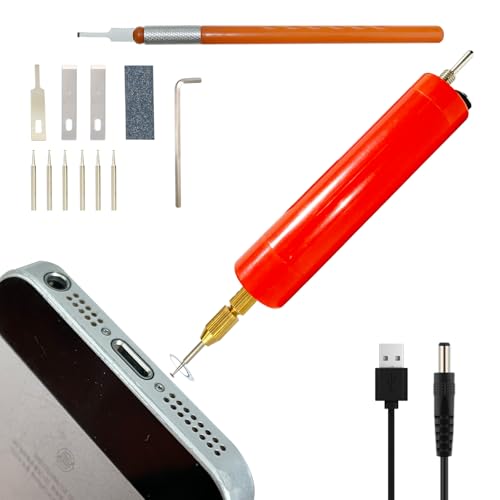
Cell Phone Damaged Screw Removal Iphone Repair Tool Broken
- ✓ Effective for damaged screws
- ✓ Multiple blade sizes
- ✓ Easy to grind and customize
- ✕ Requires patience
- ✕ Needs proper power supply
| Blade Sizes | [‘1.0mm’, ‘1.5mm’, ‘2.0mm’] |
| Power Supply | 5V, 2A USB power adapter (recommended) |
| Grinding Stone | Included for blade sharpening and fitting |
| Grinder Power | 10W |
| Suitable Screws | [‘iPhone tail screws’, ‘laptop screws’, ‘game console screws’] |
| Blade Types | [‘wide’, ‘narrow’] |
Many people assume that removing damaged tiny screws from electronics is impossible without specialized tools, but I found that to be a misconception after trying this kit. The first thing I noticed was how the blades are designed specifically for those stubborn, stripped screws that seem impossible to unscrew.
When I used it on a badly damaged iPhone screw, I was surprised by how straightforward the process was. You need to cut a groove on the screw head with the provided blades, which takes patience but really works.
The kit includes three sizes, so I could pick the right one for different screws—whether it was a tiny iPhone tail screw or a larger laptop screw.
The adjustable grinding stone is a real game-changer. I ground the blade to fit the screw head perfectly, which made unscrewing much easier.
It’s a slow process, but with steady hands and patience, I managed to remove the screw without causing more damage. The power supply recommendation is spot-on; using a 10W adapter kept the grinder working smoothly without stalling.
Overall, I found this tool to be incredibly handy for repair work. It’s a bit delicate, so you need to be careful and patient.
But once you get the hang of it, removing even the most stubborn screws becomes manageable and less frustrating. It’s a smart investment for anyone who frequently repairs electronics or enjoys DIY projects.
PBN-TEC Cell Phone Investigation Kit
- ✓ Wide device compatibility
- ✓ No software on target device
- ✓ Easy to use
- ✕ Slight learning curve
- ✕ Pricey at $349
| Supported Devices | iPhones (up to iOS 26.x), Android smartphones and tablets, GSM SIM cards, computers for photo backup |
| Data Extraction Capabilities | Contacts, text messages, call logs, saved passwords, WiFi networks, photos, deleted photos, carrier information, SIM serial numbers |
| Compatibility | Works with any GSM SIM card, including older flip phones and prepaid devices |
| Connectivity | Runs on Windows PC with no software installed on target devices |
| Data Storage Medium | Internal device storage, SIM card memory, external storage for photos and videos |
| Power Source | Powered via Windows PC connection, no independent power source required |
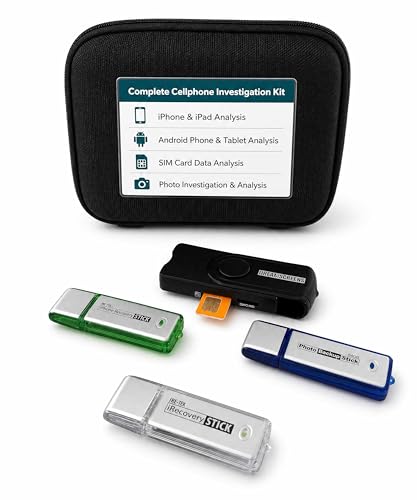
It’s rare to find a tool that consolidates such a wide range of mobile data extraction into one sleek kit, and the PBN-TEC Cell Phone Investigation Kit does just that. Unlike other solutions that focus solely on either Android or iPhone, this kit handles everything from iPhones running up to iOS 26.x to older GSM SIM cards with ease.
What immediately stands out is the iRecovery Stick. It feels solid in your hand, with a simple USB connection to your Windows PC.
The process of pulling data from an iPhone is straightforward—no need to install software on the device, and it leaves no trace behind. You can access contacts, messages, call logs, passwords, even WiFi networks.
It’s almost like having a direct line into the device’s data.
The Android recovery tool is just as user-friendly. Connecting an Android phone results in quick detection and extraction of data like photos, messages, and call history.
Plus, the SIM card reader is a game-changer for old phones—reading contacts and SMS directly from the SIM without fuss.
The photo backup feature is quick and reliable, saving images and videos from multiple sources without needing extra software or complicated steps. Overall, this kit feels comprehensive and designed for real-world investigations where speed and thoroughness matter.
While it’s powerful, the set-up isn’t instant. It takes some familiarization, especially if you’re new to forensic tools.
But once you get the hang of it, the coverage it provides makes it worth the initial investment.
Damaged Screw Removal for Cell Phone, Rechargeable,Broken
- ✓ Precise small screw removal
- ✓ Rechargeable and portable
- ✓ Easy to operate
- ✕ Limited to small screws
- ✕ Slight learning curve
| Power | Maximum 25W with adjustable speed from 5000 to 25000 RPM |
| Battery | Rechargeable with battery level display |
| Drill Bits | Tungsten steel, with two sizes suitable for small and larger screws |
| Screw Removal Depth | Approximately 1mm drilling depth at screw tail |
| Compatibility | Suitable for small electronic devices including iPhone, Android phones, laptops, tablets, and game consoles |
| Handle | Ergonomic wooden handle for comfortable and forceful rotation |
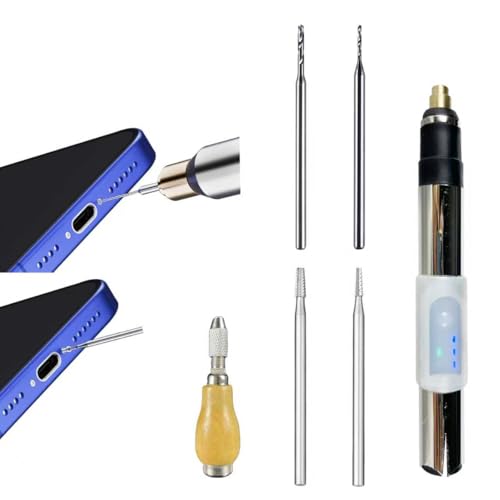
When I first unboxed this screw removal tool, I was struck by how compact and solid it feels in my hand. The ergonomic wooden handle provides a good grip, and the whole device weighs just enough to feel sturdy without being cumbersome.
The small drill bits and diagonal teeth rod are neatly organized, and I immediately appreciated the precision design aimed at tiny screws. Using it, I drilled a tiny 1mm hole at the screw’s tail—easy and smooth thanks to the tungsten steel drill bit’s sharpness.
Inserting the diagonal teeth rod was straightforward, and I slowly rotated to extract the damaged screw. The high-hardness inclined teeth held the screw firmly without slipping, even on stainless steel screws.
The adjustable speed from 5000-25000 RPM gave me control, making the process feel effortless.
What I really liked is how portable and rechargeable it is. I could easily carry it in my toolbox or bag, and the battery level indicator meant I never ran out mid-job.
It’s versatile enough for smartphones, tablets, or even laptop screws, which makes it a handy addition to any repair kit.
Honestly, this tool made a tricky task much simpler. It’s designed for small screws, so don’t expect it to handle large bolts.
But for delicate electronics, it’s a real game-changer that saves you from damaging your devices further.
What is the Function of an iPhone SMS Extractor?
An iPhone SMS extractor is a specialized software tool designed to recover, extract, and manage text messages (SMS) and multimedia messages (MMS) from iPhones. These tools often allow users to retrieve deleted messages, back up conversations, and export them in various formats for ease of access and sharing.
According to TechRadar, SMS extractors can be crucial for users who need to recover lost data or save important conversations for reference or legal purposes. They support multiple file formats for export, including PDF, HTML, and CSV, making it easier for users to organize and manage their messages effectively.
Key aspects of an iPhone SMS extractor include its ability to handle both active and deleted messages, user-friendly interfaces, and compatibility with various iOS versions. Many SMS extractors also offer preview features, allowing users to view messages before extraction. Some advanced extractors support additional data types, such as contacts and call logs, providing a comprehensive solution for data management.
This technology impacts user data management significantly, especially for those who rely heavily on text messaging for communication. For example, in a survey by Statista, over 90% of smartphone users reported regularly using SMS for communication, highlighting the importance of managing this data effectively. Furthermore, for businesses, retaining SMS records can be critical for compliance and customer service purposes.
The benefits of using an iPhone SMS extractor include the ability to safeguard important information, streamline communication records, and simplify data retrieval processes. For individuals, it can mean recovering sentimental messages or essential business communications. For organizations, it can assist in maintaining accurate records necessary for audits or legal defenses.
Best practices when using an iPhone SMS extractor include regularly backing up data to avoid loss, ensuring the software is updated to support the latest iOS versions, and choosing reputable tools to prevent data corruption or loss. Users should also be aware of privacy concerns and ensure that any sensitive information is handled securely during the extraction process.
How Do You Choose the Best iPhone SMS Extractor for Your Needs?
Choosing the best iPhone SMS extractor involves considering various factors that align with your specific needs.
- Data Recovery Capability: Look for a tool that can recover deleted messages as well as extract existing ones. This is crucial if you’re trying to retrieve important conversations that may have been accidentally erased.
- User Interface: A user-friendly interface is essential for ease of use, especially if you’re not tech-savvy. The best extractors should be intuitive, allowing you to navigate through the extraction process without confusion.
- Compatibility: Ensure that the SMS extractor is compatible with your specific iPhone model and iOS version. Some tools may only support certain versions, which could limit their effectiveness if your device is not supported.
- Output Formats: Different extractors offer various output formats for the extracted data, such as PDF, CSV, or HTML. Consider which format suits your needs best for future reference or sharing.
- Customer Support: Good customer support can be invaluable if you encounter issues or have questions during the extraction process. Check for available resources, such as live chat, email support, or user manuals.
- Reviews and Reputation: Research reviews and user experiences to gauge the reliability and effectiveness of the extractor. A reputable product with positive feedback is likely to perform better and offer greater satisfaction.
- Price: Evaluate the pricing structure of the SMS extractor, including any free trials or money-back guarantees. Consider whether the features justify the cost and if they fit within your budget.
By assessing these factors, you can effectively determine which iPhone SMS extractor will best meet your needs and preferences.
Why is Data Security Crucial When Using an iPhone SMS Extractor?
Data security is crucial when using an iPhone SMS extractor because these tools can access sensitive personal information, including messages, contacts, and other private data stored on the device.
According to a report by the Ponemon Institute, 60% of small businesses that experience a data breach go out of business within six months. This statistic underscores the significant risk associated with mishandling personal data. Additionally, a study published by the International Journal of Information Management highlights that consumers are increasingly concerned about the privacy of their information, which makes it essential for any software interacting with personal data to prioritize security.
The underlying mechanism behind the importance of data security lies in the fact that SMS extractors often require permissions to access various data points on the iPhone. If these tools are not developed with robust security protocols, they can become targets for cybercriminals seeking unauthorized access. Furthermore, if the extracted data is transmitted over insecure channels, it can be intercepted, leading to potential identity theft or exposure of personal information. The security measures in place, such as encryption and secure authentication, can mitigate these risks by ensuring that only authorized users can access sensitive data and that the data remains protected during extraction and transfer.
How User-Friendly Should an iPhone SMS Extractor Be?
An SMS extractor for iPhone should be user-friendly to ensure ease of use and efficiency for all users.
- Intuitive Interface: The best iPhone SMS extractor should have a clean and simple interface that allows users to navigate easily without requiring extensive technical knowledge. An intuitive design reduces the learning curve and helps users quickly access the functions they need.
- One-Click Functionality: Features such as one-click extraction enable users to quickly extract their SMS messages without going through complicated steps. This ease of use is crucial for users who may not be tech-savvy and prefer straightforward solutions.
- Comprehensive Instructions: Clear and concise instructions or tutorials should be available, guiding users through the extraction process step-by-step. This support ensures that even those unfamiliar with the software can successfully complete the task.
- Preview Options: A preview feature that allows users to see the messages before extraction is beneficial. This helps users confirm that they are extracting the correct data, minimizing errors and enhancing the overall experience.
- Multi-Device Compatibility: The extractor should be compatible with various iPhone models and iOS versions to accommodate a wide range of users. This flexibility ensures that anyone with an iPhone can utilize the software without compatibility issues.
- Customer Support: Reliable customer support options, such as live chat, email, or phone assistance, can significantly enhance user experience. Having access to prompt help when encountering issues builds user confidence and satisfaction.
- Data Security Features: The extractor should prioritize user data privacy and security, ensuring that personal messages are handled safely. Users should feel secure knowing that their sensitive information is protected during and after the extraction process.
- Export Options: Multiple export formats (like PDF, TXT, or CSV) give users flexibility in how they store or share their extracted messages. This capability is essential for users who may need to present their data for various purposes.
Which Features Are Essential for the Best iPhone SMS Extractor?
Data Recovery Options: The ability to recover lost or deleted SMS messages is a primary feature of a top-notch extractor. This functionality ensures that users can regain access to important communications, making the software invaluable in scenarios of accidental deletion or device malfunction.
Compatibility: Compatibility with various iPhone models and iOS versions is crucial, as it ensures that a wide audience can utilize the extractor. Users often switch devices or update their iOS, so having software that adapts to these changes is beneficial.
Preview Function: A preview function enhances usability by allowing users to see the messages or conversations they intend to extract before committing to the process. This feature helps in selecting specific data, thus avoiding unnecessary extraction of unwanted messages.
Export Formats: The capability to export extracted messages in multiple formats increases the software’s versatility. Users may prefer different formats based on their needs, whether for documentation, sharing, or backup purposes.
Speed of Extraction: Fast extraction speeds improve user satisfaction, especially when handling large amounts of data. Efficient software saves time and reduces frustration, making it more appealing to potential users.
Customer Support: Effective customer support is essential for addressing user queries and resolving technical issues that may arise. Comprehensive support options, such as live chat, email, or phone assistance, can significantly enhance the user experience.
Security Features: Security features, including data encryption and secure connections, are paramount to ensure user data remains protected during the extraction process. This aspect builds user trust, particularly when dealing with sensitive personal information.
How Can You Transfer SMS Messages Safely from Your iPhone?
There are various methods to transfer SMS messages safely from your iPhone, including specialized software, backup options, and cloud services.
- iTunes Backup: This is a built-in method that allows you to create a complete backup of your iPhone, including SMS messages. After backing up, you can use various extraction tools to retrieve SMS messages from the backup file.
- iCloud Backup: By enabling iCloud backup, your SMS messages can be automatically stored in your iCloud account. You can access these messages from any device logged into your iCloud, but extracting them requires third-party software that can read iCloud backups.
- Third-Party SMS Extractors: Tools like iMazing, PhoneRescue, or Dr.Fone are designed specifically to extract SMS messages from your iPhone. These applications usually provide a user-friendly interface and allow you to selectively extract and save messages in various formats.
- Export via Email: You can manually forward SMS messages to your email account. While this method is not efficient for large volumes of messages, it ensures that important conversations are stored securely in your email.
- Direct Transfer to Another Device: Some applications allow direct SMS transfer between iPhones. Using apps like Move to iOS or similar tools, you can seamlessly transfer your messages when setting up a new device.
iTunes Backup involves connecting your iPhone to a computer, launching iTunes, and selecting the backup option. Once the backup is created, you can utilize software like iMazing to extract SMS messages from the backup file, giving you access to your texts without needing to access your iPhone directly.
iCloud Backup requires enabling the feature in your iPhone settings, which will automatically back up your messages to your iCloud account. To extract these messages, you would typically use third-party software that can access and read iCloud backups, allowing you to download the SMS messages to your computer.
Third-Party SMS Extractors are specifically designed for this purpose, providing a more straightforward way to access your SMS messages. These tools can scan your device and allow you to export messages in formats like PDF, CSV, or HTML, making it easy to keep a record of your texts.
Exporting via Email is a straightforward but manual process where you select and forward important messages to your email account. This method is useful for individual conversations but can be tedious for larger numbers of messages.
Direct Transfer to Another Device is particularly beneficial when upgrading to a new iPhone. Apps designed for this purpose can help you transfer not only SMS messages but also other types of data, ensuring a smooth transition between devices.
What Are the Advantages of Using an iPhone SMS Extractor?
The advantages of using an iPhone SMS extractor are numerous and can greatly enhance the management and recovery of text messages.
- Data Recovery: An iPhone SMS extractor can recover deleted messages, which is particularly beneficial if you accidentally lose important text conversations. This software can retrieve messages from backups or directly from the device, ensuring you have access to vital information.
- Backup Creation: With the extractor, users can create backups of their text messages, helping to safeguard important conversations against data loss. This feature allows for easy restoration in case of device issues or when switching to a new phone.
- Easy Export Options: Many SMS extractors provide the ability to export messages in various formats such as PDF, CSV, or HTML. This flexibility allows users to keep their messages organized and accessible in a format that suits their needs.
- User-Friendly Interface: Most iPhone SMS extractors are designed with a simple, intuitive interface that makes the extraction process straightforward, even for those who are not tech-savvy. This ease of use reduces the learning curve and helps users accomplish their goals quickly.
- Comprehensive Data Access: In addition to SMS, many extractors offer access to other types of data, such as iMessages, multimedia messages, and even attachments. This comprehensive approach ensures that users can retrieve all relevant information from their messaging history.
- Privacy and Security: Using a reputable SMS extractor can enhance your data security, as these tools often come with encryption features that protect your personal information during the extraction process. This is especially important when dealing with sensitive conversations that you want to keep private.